
nMacro
2.0.2
Size: 608 KB
Downloads: 4858
Platform: Windows (All Versions)

If you want to be more productive and get things done faster, then you definitely need to take advantage of the functionality nMacro has to offer. With this application you can assign hotkeys to your favorite applications and/or frequently accessed files – press the hotkey and the application or file shows up. On top of that, you can create projects and save them as executables. Run the executable and the actions you put in the project will run automatically. There are a bunch of example projects included to help you get started.
The nMacro installation file is a very lightweight 607KB, meaning that in a blink you’ll have it on your machine. It is quite easy to go through the setup wizard and have nMacro installed on your machine; support for 32 and 64-bit editions of XP, Vista, and Windows 7 is provided. The setup wizard will ask you to pick one of several supported languages: English, French, Italian, Spanish, and German.
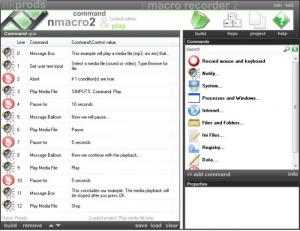
When you launch nMacro, you are asked a simple question: would you like to start a new project, or would you like to open an existing one? After you pick either “New Project” or “Open Project”, you are presented with the nMacro interface. The list in the left hand side presents the actions you selected to be included in the project. The Commands pane to the left presents the actions you could include, and the Properties pane from the bottom right hand corner lets you customize these actions.
To help you get started, nMacro comes with a list of example projects. There is an example that will play a media file. Load it into nMacro and you will see the 12 steps included in the project. Hit the Build button from the bottom left hand corner and you can save the project as an executable. Once you do that, you will be asked if you like to run the output – choose to run it and the 12 steps presented in the project will be run automatically.
Creating a project of your own is a relatively straightforward matter. All you have to do is pick one of the many commands presented in the Commands pane. Then, for every command you pick, you must specify specific values from the Properties pane underneath. If you want to run an action that is not included in the Commands list, you can use the Record Mouse and Keyboard function; nMacro records your actions and then do precisely what you did. When you’re done with your project, hit the Build button and save it as an executable. Or if you want to work on it later, save it.
Please note that nMacro is only free to try, meaning that the output files will automatically be deleted. The saved executable will be deleted after the first launch. To get rid of this limitation, purchase a license for nMacro.
Getting back to the application’s functionality, you can assign keys to applications and files. Select the hotkey combo, select the file or application you want to assign the hotkey to, then hit “Add hotkey.” When you press that hotkey, the selected application or file will launch. This works even when nMacro is closed.
By letting you create executables that perform tasks automatically and by letting you assign hotkeys to files and folders, nMacro makes you more efficient and saves you time. This tool is a must have for anyone who wants to get things done rapidly.
Pros
nMacro provides support for multiple languages. Example projects are provided to help you understand what you can achieve with the application. Create projects and save them as executables; run the executable and the actions specified in the project will be carried out automatically. Assign hotkeys to files and folders.

Cons
The executable will automatically be deleted after the first launch.

nMacro
2.0.2
Download
nMacro Awards

nMacro Editor’s Review Rating
nMacro has been reviewed by George Norman on 28 May 2012. Based on the user interface, features and complexity, Findmysoft has rated nMacro 4 out of 5 stars, naming it Excellent







